
Quick answer: the best tech gifts for parents and grandparents are the ones you set up once and they never have to think about. From our reviews that means an easy mesh WiFi kit (Amazon eero 7), an alarm with no contract (SimpliSafe 8-Piece) and a family password manager you run for them (1Password Families). Add the four free fixes further down; they stop more scams than any gadget.
Most gift lists for older relatives are full of gadgets that create work: another app, another password, another thing that beeps. The picks here were chosen the other way round. Each one either replaces something they already own with a version that needs less attention, or moves a job from them to you.
How to read this page:
- Scores are the ones on each review page. They are research-based, not hands-on. The method is on how we pick and score products.
- Prices are shown as bands, taken from the list price on each review. Check the store before you buy.
- Links: we earn a commission if you buy through the store links. It does not change which products are listed.
The six gifts compared
| Gift | Why it suits a parent or grandparent | Your job | Cost after Christmas | Our score | Price band |
|---|---|---|---|---|---|
| Amazon eero 7 | Short app setup, heals dead zones by itself | Set it up, keep the app on your phone | Optional eero Plus plan | 8.7/10 | $200–400 |
| SimpliSafe 8-Piece | No contract, siren works without a plan | Install it (about 30 minutes) | Optional monitoring plan | 8.7/10 | $200–400 |
| 1Password Families | Shared vaults, account recovery | Run the family account | Yearly renewal | 9.2/10 | $50–100 a year |
| Norton 360 Deluxe | One suite for five devices, scam protection | Install it, manage the renewal | Renewal costs more | 9.0/10 | Under $50 a year |
| eufy Doorbell E340 | See who is at the door, no monthly fee | Mount it, add the app to their phone | None | 8.8/10 | $100–200 |
| Yubico Security Key C NFC | Locks the main email account against phishing | Enroll two keys, keep one as backup | None | 8.9/10 | Under $50 |
WiFi that looks after itself: Amazon eero 7
If your parents’ router is the one their internet provider installed years ago, a new one is the most practical gift on this list. An old router that no longer gets updates is a security problem, and you can check theirs in a few minutes with our guide on whether a router still gets updates.
The eero 7 is the kit our review rates for a ten-minute app setup that non-technical family members can do. Three compact units cover about 6,000 sq ft, and the system routes around dead zones without anyone touching it. eero also publishes minimum security update dates for its current devices.
What to know before you buy: the advanced security and parental tools need an eero Plus subscription, and the eero 7 is dual-band, with no 6 GHz band. For a parent’s house neither is likely to matter.
An alarm without a contract: SimpliSafe 8-Piece
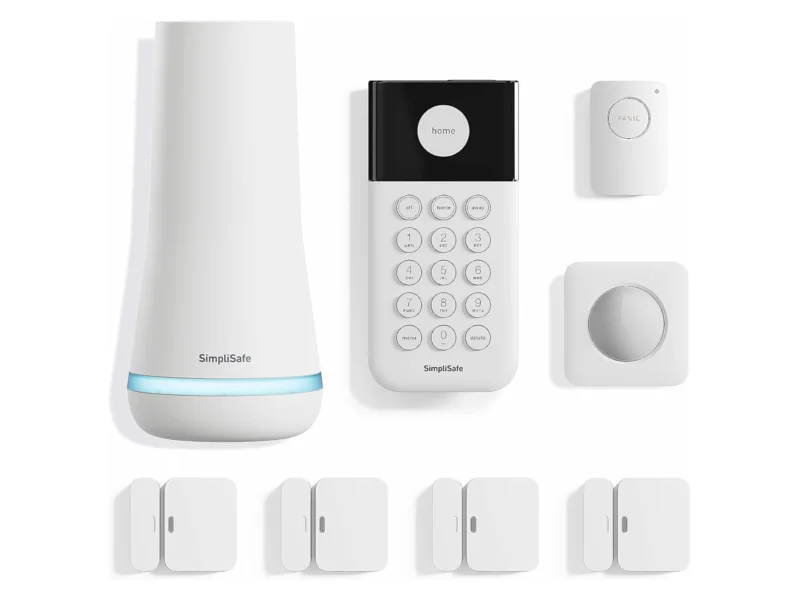
Our review lists this kit as best for seniors and parents. It comes with a base station, a keypad, four entry sensors and a motion sensor, and is a do-it-yourself install of about 30 minutes. The base station has cellular and battery backup. The local siren works with no subscription at all.
Professional monitoring is optional and billed monthly. Without a plan, the camera and app features are thin, which our review counts as a downside. Decide before Christmas whether you are giving the kit alone or the kit plus a year of monitoring.
Passwords you can help with: 1Password Families
The usual advice, “use a password manager”, fails with many older relatives because nobody sits down and does it with them. So make that the gift. One 1Password Families plan covers five people. You create the family account, invite your parents and save their email and banking logins with them. Shared vaults let you keep copies of the logins they would call you about anyway, and family account recovery means a forgotten password does not lock them out for good.
It renews every year and has no free tier. If cost is the concern, Bitwarden Premium does the essentials for less, with apps that are a little less polished.
One security suite: Norton 360 Deluxe
Our review rates Norton 360 Deluxe best for beginners who want everything in one place. One license covers five devices and includes an unlimited VPN, 50 GB of cloud backup for a PC, dark web monitoring and scam protection. It is sold as a key card, so there is something to wrap.
Two downsides from our review apply to this audience in particular. It can feel heavy on an older PC, and the renewal pricing and upsell prompts are aggressive. Put the renewal date in your own calendar and tell your parents to ignore any pop-up that asks for more money.
A doorbell that shows who is there: eufy Doorbell E340
A video doorbell lets a parent see who is at the door from a chair or from another room. The E340 has two cameras, one facing forward and one looking down at the doorstep, 8 GB of local storage and color night vision. It needs no subscription and runs on battery or the existing doorbell wiring, so you can fit it during a visit.
For the parent whose email you worry about: a security key
If a parent has already clicked a convincing fake login page once, a hardware key is the fix. The Yubico Security Key C NFC plugs into USB-C or taps on a phone, and it will not sign in to a fake site. Enroll two keys on the main email account and keep the second one somewhere safe as the backup, as our review advises. This gift needs the most hand-holding of the six, so only choose it if you can be there for the setup.
Four free fixes to do while you visit
None of these needs a purchase, and each takes less time than Christmas dinner.
- Agree a family safe word. Voice-cloning scams target grandparents with calls that sound like a grandchild in trouble. A word only the family knows defeats them. Our safe word guide has the rules and the scripts.
- Lock their phone number. T-Mobile, Verizon and AT&T all offer free settings that block SIM swaps. The steps are in how to lock a phone number.
- Freeze their credit. It is free at all three bureaus and does not affect existing cards. Follow the three-bureau walkthrough.
- Teach one rule about texts. Nobody pays, logs in or “verifies” through a link that arrived by text. The toll and package scam briefing explains why that single rule works.
Set it up before you leave
- Install and sign in to everything yourself. A gift left in its box is the most common way these presents fail.
- Write the two or three things they need to know on one sheet of paper and put it by the router or the phone.
- Put every renewal date in your calendar, not theirs.
- Tell them what a real alert from the new device looks like, so a fake one stands out.
Shopping for the rest of the family too? The security gift guide by budget has fourteen picks from under $50 upward.